
The way businesses communicate has evolved far beyond traditional phone systems. Teams now need flexibility, mobility, and integrations that align with the tools they already use. That’s where Aircall stands out — a cloud-based communication platform designed for sales and support teams that thrive on efficiency.
In this Air call review, we’ll explore how the platform performs in real-world business environments — from its intuitive interface and AI-powered tools to its pricing model and usability. Let’s see if this is the communication upgrade your team truly needs.
What Is Aircall?
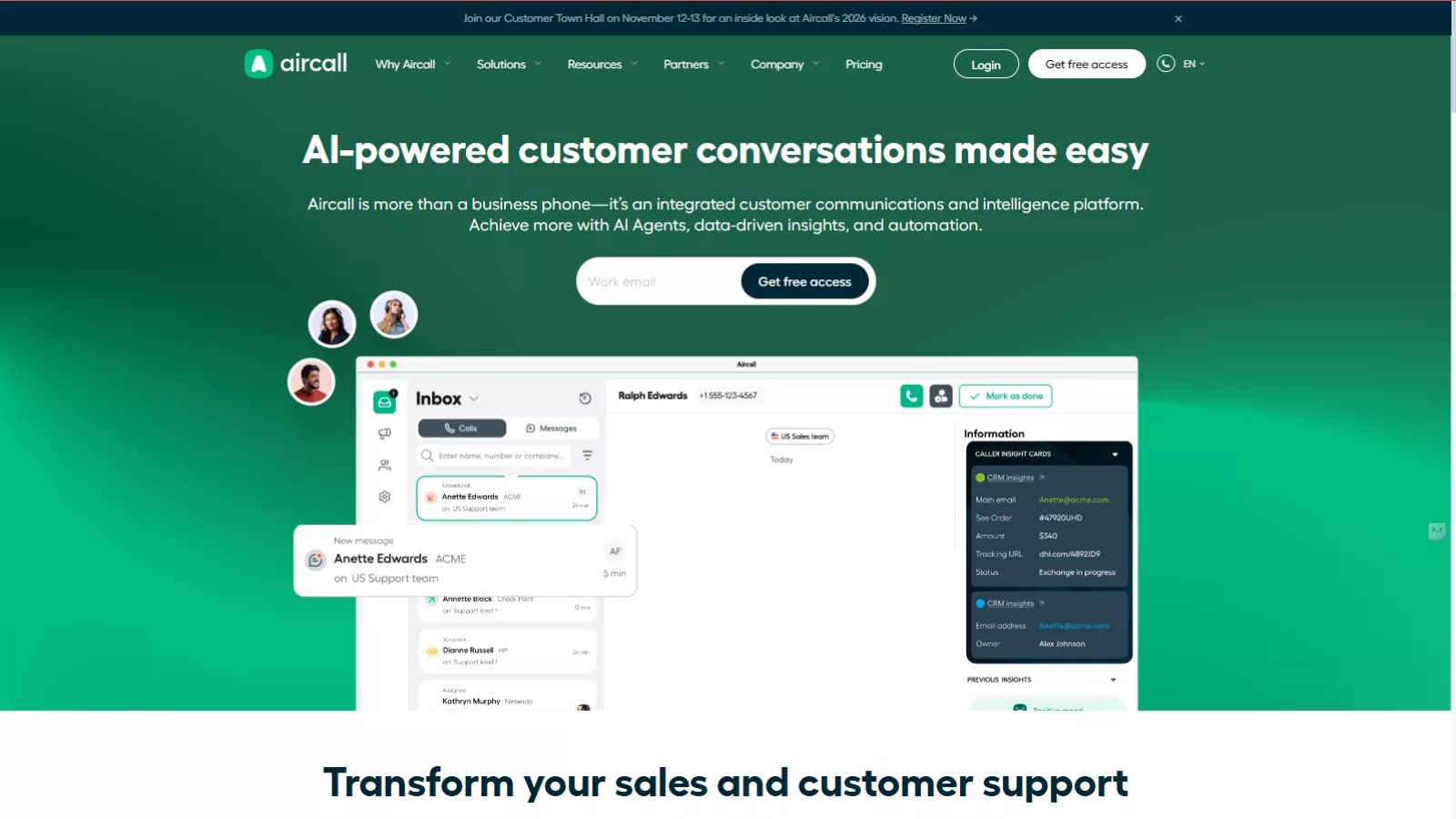
Aircall is a cloud-based phone system built for modern businesses. Instead of relying on clunky hardware or complex installations, it operates entirely online. Users can make, receive, and manage calls through a desktop or mobile app, connecting teams seamlessly from anywhere.
Its biggest advantage lies in its integration ecosystem. Aircall syncs effortlessly with CRMs like Salesforce, HubSpot, and Zendesk — ensuring that call data, notes, and follow-ups are automatically logged without manual effort.
Whether you’re managing customer support, a sales team, or an entire remote workforce, the Air call app turns every device into a fully functional business phone system.
The Interface and User Experience
From a reviewer’s perspective, the first impression of Aircall is simplicity. The dashboard is clean, minimal, and easy to navigate, even for first-time users. Setting up extensions, numbers, and call routing takes minutes.
You don’t need IT specialists or technical know-how— just sign up, choose your number, invite your team, and start calling. The web and mobile interfaces both offer the same level of functionality, allowing users to switch devices without losing progress or data.
Call quality is crisp and consistent most of the time, provided there’s a stable internet connection. For cloud-based communication, that’s a crucial factor — and Aircall delivers fairly well here.
Top Features That Make Aircall Stand Out
1. Power Dialer for Efficient Sales Outreach
The Power Dialer is a highlight feature that instantly boosts productivity for sales teams. Instead of manually dialing each contact, it compiles a list of numbers and automatically dials them one after another.
Even better — it integrates directly with CRMs like Salesforce. This means call logs, notes, and follow-up actions are automatically saved, saving reps around two minutes per call. Over hundreds of calls, that efficiency adds up.
For businesses that rely heavily on outbound calls, this automation can significantly improve performance and reduce repetitive tasks.
2. Smart Call Routing with IVR
Another impressive feature is the interactive voice response (IVR) system. Businesses can design IVRs visually, setting up multiple layers to direct customers to the right departments or agents.
For example, calls can be routed differently based on time zones, working hours, or customer preferences. It also allows adding waiting music, custom messages, and even text-to-speech elements — creating a more polished experience for callers.
What makes this even better is its 24/7 capability. Even after business hours, the IVR can provide key information, redirect customers to voicemail, or guide them toward self-service options.
3. Data-Driven Insights
Aircall includes built-in analytics and dashboards that help managers make informed decisions. Real-time tracking covers metrics like call volume, duration, missed calls, and resolution time.
This level of visibility is especially useful for large teams. Managers can identify bottlenecks, track agent productivity, and refine training strategies. Custom reports make it easy to align performance metrics with business goals.
In short, Aircall turns everyday communication data into actionable insights that support better decision-making.
4. Integrated Call Management
The platform’s computer telephony integration (CTI) connects your phone system directly to CRM and support tools. Whenever an agent receives a call, a “screen pop” appears showing the customer’s name, history, and relevant account data.
This real-time context eliminates time wasted on searching for details during a call. Agents can also take notes, view prior conversations, and update records — all within one window.
For businesses that rely on personalized service, this integration-driven workflow helps enhance both productivity and customer satisfaction.
5. Click-to-Dial and Instant Number Activation
With Aircall’s click-to-dial feature, users can call any phone number they see online — on a CRM, website, or email — with just one click. The app detects phone numbers and enables instant dialing, removing the hassle of manual entry.
It’s a small but powerful feature, especially for sales teams that frequently reach out to prospects. The reduction in friction means faster responses, fewer mistakes, and smoother communication flows.
AI and Automation in Aircall
Aircall’s newer updates include AI-powered tools like call summaries and sentiment analysis. The goal is to help teams extract key insights from every customer interaction without having to review calls manually.
This direction aligns well with the growing trend of AI-assisted communication, making Aircall not just a telephony system but an intelligent business communication hub.
While these AI features are still evolving, their inclusion gives Aircall an edge over traditional VoIP systems.
Performance and Reliability
Performance-wise, Aircall does well under stable internet conditions. Calls are clear, with minimal delay or distortion. However, like many cloud-based systems, performance can dip slightly during internet instability, which may result in dropped calls or minor lags.
The platform does include built-in redundancy systems to maintain uptime, but users should still ensure they have a reliable connection for the best experience.
That said, setup and daily use remain smooth. Updates are frequent, and support is responsive — a plus for teams who value technical reliability.
Aircall Pricing
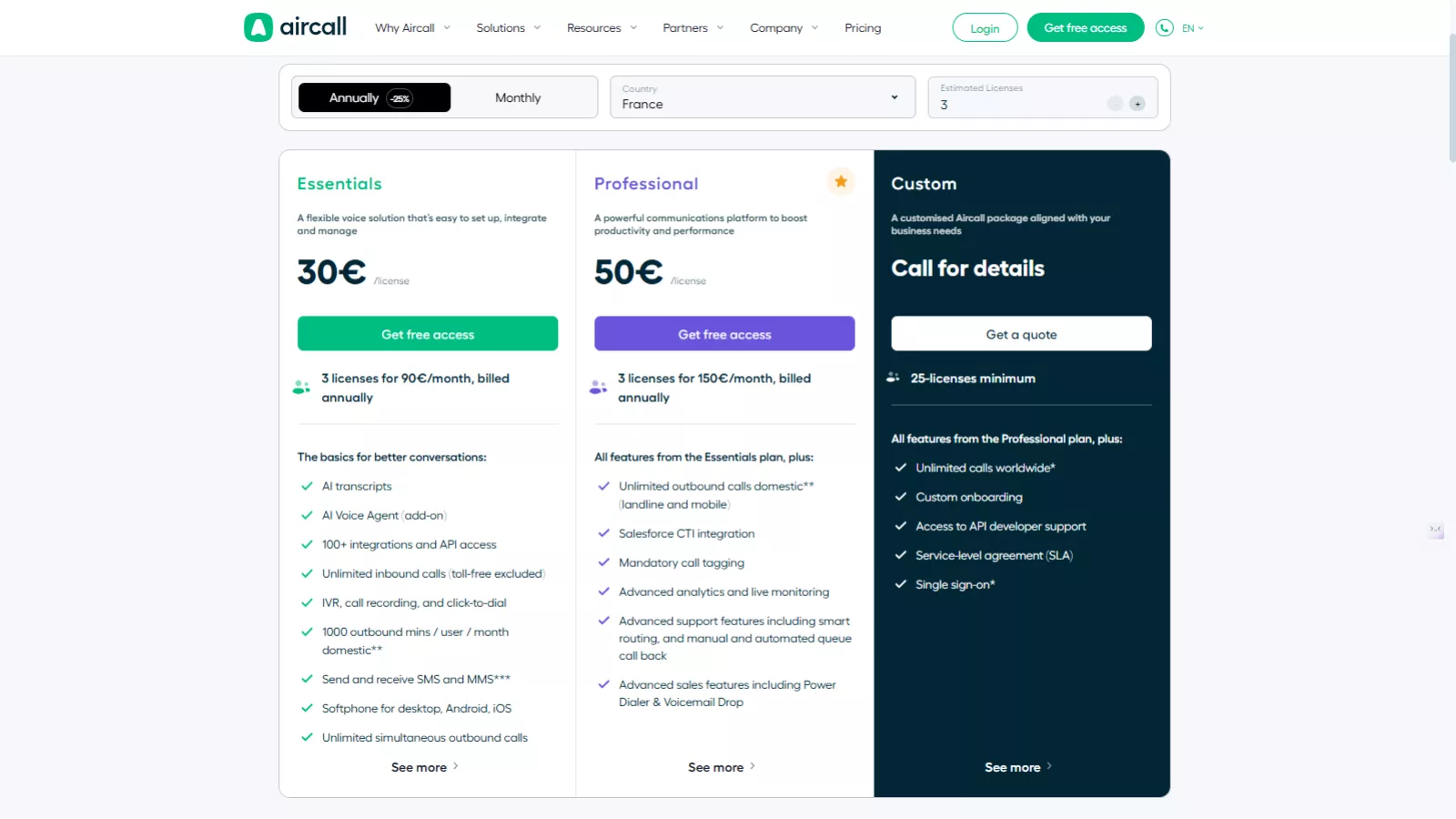
Now, let’s talk about Air call pricing — an important factor for any business considering this platform.
Aircall typically offers tiered plans, depending on features and team size. The pricing structure includes essential communication tools in the base plan, while advanced features like analytics, integrations, and AI insights are available in higher tiers.
It’s worth noting that Aircall offers pricing that varies depending on different countries, ensuring flexibility for businesses operating globally.
While the platform offers great value for medium to large teams, it might feel a bit costly for small startups. However, the time saved through automation, integrations, and AI assistance often balances out the cost over time.
If you’re planning to download Air call, it’s available for both desktop and mobile devices — and you can start with a free demo or trial before committing to a paid plan.
Pros and Cons
Pros:
- Seamless CRM and business app integrations
- Simple setup and cloud-based operation
- Excellent analytics and data visualization
- IVR and automation tools for better customer handling
- AI features improving insights and efficiency
- Works across web, desktop, and mobile platforms
Cons:
- Occasional call quality issues under weak connections
- Integration setup may require some technical expertise
- Slightly expensive for smaller teams
- Some advanced AI features are still in beta
Who Is Aircall Best For?
If your business depends heavily on calls — whether for sales, customer support, or client outreach — Aircall is a solid option. It’s built to streamline operations, improve call tracking, and keep customer data synced automatically.
Remote teams, startups scaling fast, and companies with distributed sales teams can especially benefit. The ability to manage everything from a single dashboard — from call analytics to routing and follow-ups — saves countless hours of administrative work.
On the other hand, for very small teams or freelancers, the pricing may feel steep unless the call volume justifies it.
Also Read
CloudTalk Review 2025: Features, Pricing, And Alternatives
Alternatives For Aircall
Here are 5 good alternative tools to Aircall:
-
Dialpad — AI-powered voice, video, messaging with real-time transcriptions and analytics.
-
Nextiva — Unified communications: calls, SMS, video + built-in CRM.
-
RingCentral (MVP) — Enterprise-grade cloud phone + messaging + video with rich integrations.
-
Five9 — Cloud contact center with omnichannel support and workforce-management features.
-
CloudTalk — CloudTalk focused on call center teams, offering advanced call routing and analytics.
Final Verdict: Is Aircall Worth It?
After analyzing features, usability, and value, this Aircall review concludes that it’s one of the most efficient cloud-based communication platforms available today. Its AI capabilities, real-time analytics, and CRM integrations make it an excellent fit for growth-driven teams.
While it’s not the cheapest solution on the market, the productivity gains and ease of management justify the cost — especially for organizations aiming to elevate customer communication quality.
In simple terms, Aircall bridges the gap between traditional telephony and intelligent communication systems. It’s fast, reliable, and built for businesses that take conversations seriously.
If you’re looking for a communication platform that grows with your team and integrates seamlessly into your digital workspace, Aircall is worth considering.
FAQs
- Is Aircall free to use?
No, Aircall is a paid platform, but it offers a free trial so you can explore its features before purchasing a plan. - Can I download Aircall on my phone?
Yes, you can download Aircall from both the App Store and Google Play Store for seamless mobile access. - Does Aircall work with CRM tools like Salesforce or HubSpot?
Absolutely. Aircall integrates smoothly with CRMs, help desks, and other business tools, ensuring complete data synchronization. - What kind of support does Aircall provide?
Aircall offers 24/7 customer support with onboarding assistance, knowledge base resources, and live chat for technical queries. - Is Aircall good for remote teams?
Yes. Being cloud-based, Aircall is ideal for remote or hybrid teams that need flexible and reliable communication channels.